
I am not the type of gamer who spends hours adjusting graphics settings or checking every Windows process before playing. Most of the time, I just want to sit down, launch a game, and start playing. Still, I noticed that my PC did not always perform the same way. Some days my games ran smoothly. While on others I dealt with small FPS drops, background apps, or connection issues.
That is what made me try Smart Game Booster. I wanted to see how useful it would be for my normal gaming routine. After using it before different gaming sessions, I found that its biggest benefit is convenience. It gives me several tools for getting my PC ready without requiring me to change lots of settings myself.
Why I Tried Smart Game Booster?
I have quite simple gaming habits. I play both multiplayer and single-player games based on my mood. However, I don’t always have enough time to spend to troubleshoot the performance issues. Sometimes, I just want to start the game without even closing the programs running backend. Due to which, sometimes my games don’t run as smoothly as these should.
Besides that, I also had outdated drivers or unneeded files which were taking up my space. These problems never looked serious on their own. However, they can affect my gaming experience together. So, I thought of giving Smart Game Booster a try. It definitely improved my gaming experience without making me prepare my PC before starting every gaming session.
Features I Find Useful as an Everyday Gamer
Here are some of the useful features I explored during testing this smart game booster tool.
FPS Optimization
FPS is one of the first things I look at when a game does not feel right. Smart Game Booster helps reduce background activity and gives the game more access to available system resources. I did not see huge FPS increases in every game, but I noticed that some games felt more stable after using the boost mode.
I think this is one of the more useful parts of the software for gamers who mainly want to reduce sudden frame drops. I also tried its dedicated FPS Booster features when I wanted to focus specifically on game performance.
Background Process Management
This is probably the feature I use most often. I usually have several programs open before gaming, and I do not always remember to close them. Smart Game Booster helps reduce unnecessary background activity before I start playing.
That can free up CPU and memory that would otherwise be used by apps I am not currently using.
Global Server Support
I also noticed that the software supports connections through servers in different regions. I do not use this feature every day but I found it useful when playing with friends who were located in other countries. It gives me another option when connecting to overseas game servers.
Network Optimization
High ping can also be as frustrating as low frame rates. Smart Game Booster includes network optimization tools that aim to improve the route between my PC and game servers. I found that some online sessions felt more stable after using the network boost during my testing.
However, I would not expect it to solve every connection problem. A poor internet plan or an issue with my internet provider still needs to be dealt with separately.
What I Don’t Like?
- Results can vary from one PC to another
- It cannot replace better gaming hardware
- Network optimization cannot fix every internet issue
- Some features may require a paid plan
- Users with high-end PCs may notice only small changes
How I Use Smart Game Booster?
I normally follow these four steps before playing to use Smart Game Booster.
Open Smart Game Booster
I downloaded and installed Smart Game Booster on my Windows PC. After opening it, I let the software scan my system and check its current condition.
Select my game
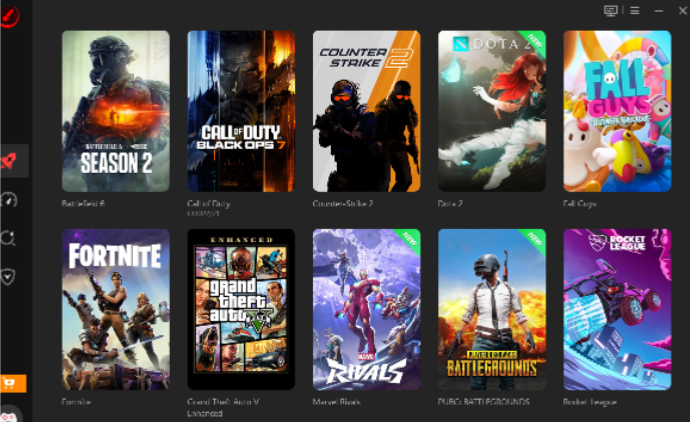
I chose the game I wanted to play from the available list. This made it easy to prepare my PC before launching the game.
Start the boost
I clicked the boost option and allowed the software to manage unnecessary background tasks and free up system resources.
Launch the game
Once the boost was complete, I started playing. I usually checked how stable the FPS felt and, for online games, paid attention to ping and connection stability.
The whole process was quicker than manually checking everything myself.
Final Thoughts
After using Smart Game Booster as part of my regular gaming routine, I think its biggest benefit is convenience. I like that the software covers more than FPS. Still, I think it is important to keep expectations realistic. The results will depend on the PC, game, and connection being used.
Overall, Smart Game Booster is most useful as an everyday gaming helper for me. It makes the preparation process quicker, helps reduce some common sources of performance problems, and lets me spend less time adjusting my PC and more time actually playing.