
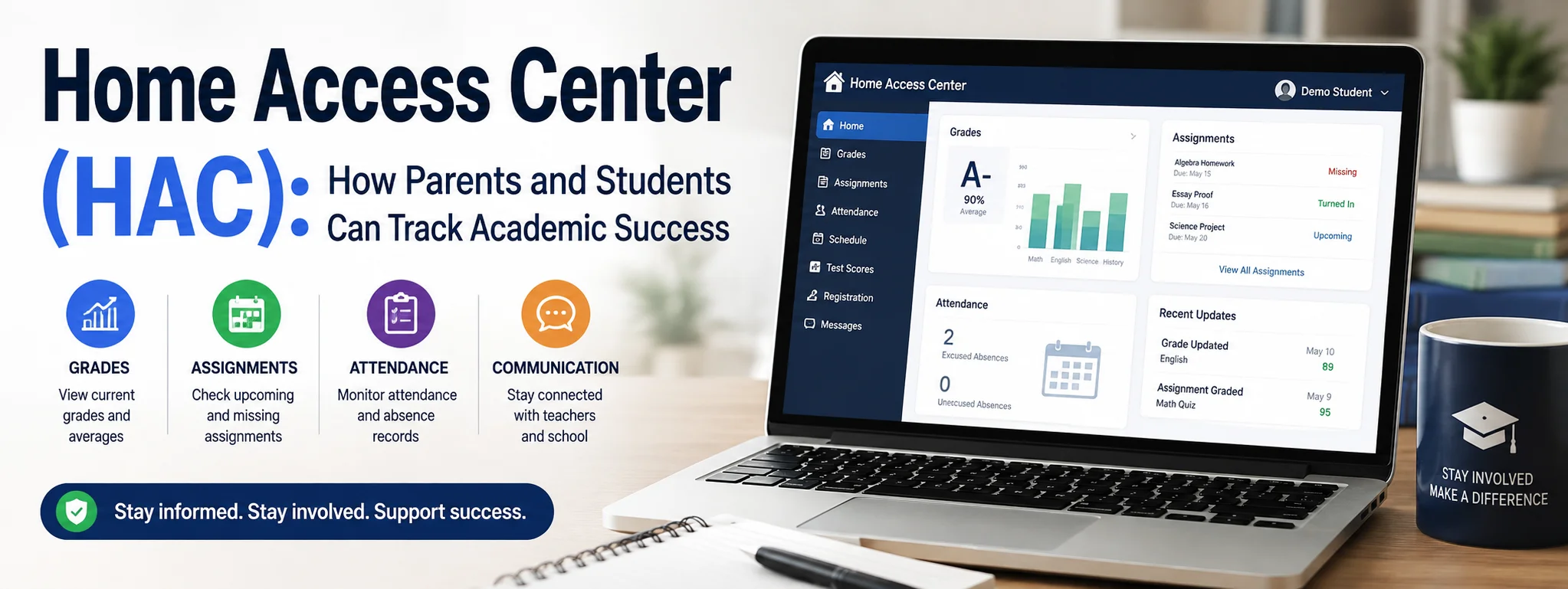
In the modern digital era, staying connected with your child’s education no longer relies on waiting for end-of-term paper report cards or parent-teacher conferences. Educational technology has revolutionized how schools communicate with families, and at the forefront of this digital shift is the Home Access Center (HAC).
Whether you are a parent trying to keep tabs on upcoming assignments or a student striving to maintain high grades, Home Access Center serves as your all-in-one academic portal. This comprehensive guide covers everything you need to know about HAC—from how it works and its core features to practical strategies for making the most of this essential tool.
What is Home Access Center (HAC)?
Home Access Center (HAC) is a secure, web-based portal developed by PowerSchool (formerly eSchoolPlus) that provides parents, guardians, and students with real-time access to educational records. Designed to foster open communication between schools and homes, HAC acts as a centralized dashboard where academic progress, daily logistics, and administrative records live.
Instead of guessing how well a student is performing or relying on paper notes tucked inside backpacks, families can log into HAC from a computer, tablet, or smartphone to view updated school records instantly.
Key Features of Home Access Center
Home Access Center includes a rich suite of tools designed to cover every aspect of a student’s academic journey. While specific features can vary slightly depending on your school district’s custom configuration, the core tools usually include:
1. Real-Time Gradebook and Classwork Tracking
The gradebook view is the most frequently visited feature in HAC. It provides a granular look at:
-
Current class averages for every enrolled course.
-
Detailed breakdowns of individual assignments, quizzes, tests, and projects.
-
Teacher comments, rubric scores, and weighted category values (e.g., homework vs. major exams).
-
Indicators for missing, late, or incomplete work.
2. Daily and Cumulative Attendance Monitoring
Consistent attendance directly correlates with academic achievement. HAC makes it simple to monitor:
-
Daily attendance records (excused vs. unexcused absences).
-
Period-by-period class attendance for middle and high school students.
-
Tardy logs and early dismissal tracking.
3. Class Schedules and Course Registration
Navigating course requirements becomes much easier with integrated scheduling features:
-
Current Schedules: View room numbers, class periods, and teacher contact information.
-
Course Requests: During registration season, students and parents can often select next year’s elective courses and academic tracks directly within the portal.
4. Comprehensive Demographic and Contact Data
HAC stores student registration records, including primary emergency contact numbers, medical alerts, address details, and guardian preferences. Keeping this information updated ensures school administrators can contact you immediately during emergency situations.
5. Official Reports and Transcripts
At the end of each grading period, physical report cards become optional. HAC allows users to view and download:
-
Interim progress reports.
-
Quarterly and semester report cards.
-
Unofficial high school transcripts and cumulative GPA calculations.
Why Home Access Center Matters for Parents and Students
Implementing a system like HAC offers distinct advantages for everyone involved in the learning process.
| User Group | Main Benefits |
| Parents & Guardians |
• Eliminates surprises on report card day
• Enables timely support when grades dip
• Streamlines direct communication with teachers |
| Students |
• Encourages personal responsibility and accountability
• Makes tracking missing work straightforward
• Helps manage long-term study schedules |
| Educators |
• Reduces daily administrative inquiries about grades
• Creates transparency around assignment scoring
• Supports proactive parent outreach |
Step-by-Step: How to Access and Log Into HAC
Accessing Home Access Center is a straightforward process, provided you have your login credentials set up through your school district.
+-------------------------------------------------------------+
|                     HAC Navigation Steps                    |
+-------------------------------------------------------------+
| 1. Visit your school district's official website            |
| 2. Locate the "Parents" or "Students" portal menu           |
| 3. Click the direct link for "Home Access Center (HAC)"     |
| 4. Enter your District-assigned Username and Password       |
| 5. Review the main dashboard & configure notification preferences |
+-------------------------------------------------------------+
Tips for First-Time Users:
-
Account Request: If you haven’t received your credentials, reach out directly to your school’s registrar or IT helpdesk.
-
Password Security: Always change your initial temp password to a secure, unique password upon your first successful login.
-
Bookmark the Portal: Add your district’s specific HAC login URL to your browser bookmarks for quick daily or weekly checks.
Mobile Access: Navigating eSchoolPLUS Family
For parents and students on the go, accessing HAC through a web browser on a phone can sometimes feel clunky. PowerSchool offers a dedicated companion app called eSchoolPLUS Family (available on both iOS and Android platforms).
By logging in with your district credentials inside the app, you gain access to an optimized mobile interface featuring:
-
Push notifications for new assignment grades or unexcused absences.
-
Quick-view daily schedule timetables.
-
One-tap email links to contact course instructors.
Best Practices for Using HAC Effectively
While having access to real-time data is empowering, it can occasionally lead to unnecessary stress if not managed thoughtfully. Here are a few recommended strategies for families using HAC:
Set a Routine Schedule
Rather than checking the portal multiple times a day, establish a predictable routine. Checking grades once or twice a week (e.g., every Friday afternoon) allows teachers time to enter scores without creating constant anxiety over un-graded submissions.
Use Missing Work as a Learning Opportunity
If a missing assignment pops up, treat it as a constructive conversation starter rather than a point of conflict. Help your student identify why it was missed—whether due to organization, time management, or missing materials—and guide them on how to communicate with their teacher.
Give Teachers Time to Grade
Remember that major essays, exams, and projects require time to evaluate. A blank entry in the gradebook often simply means the assignment is actively being reviewed, not that your student failed to turn it in.
Frequently Asked Questions
1. What should I do if I forget my Home Access Center username or password?
Most HAC login pages feature a “Forgot My Username or Password” link directly below the login credentials field. If clicking that does not work or if your email isn’t recognized, contact your school district’s technology support team or main office registrar for a manual password reset.
2. Why can’t I see grades for a specific class or assignment?
There are two common reasons: the teacher may still be grading the submission, or the course uses a non-standard evaluation framework. If an assignment remains blank for an extended period, encourage your student to speak with their teacher first before sending a polite inquiry email.
3. Can multiple guardians have separate HAC accounts for the same student?
Yes. School districts can issue distinct login credentials for each parent or legal guardian listed in the student’s official emergency records. This allows both parents to stay updated independently.
4. Is Home Access Center secure?
Home Access Center utilizes industry-standard encryption protocols to protect sensitive educational data. Student records are strictly accessible only to authorized district personnel, students, and their registered guardians.
5. How quickly are attendance records and grades updated in HAC?
Attendance updates are typically reflected in real time or by the end of each school day. Grade updates depend on individual teacher workflow; simple quizzes may appear within 24–48 hours, while major projects or papers can take up to a week or more.
Final Thoughts
Home Access Center (HAC) is far more than just a digital gradebook—it is a powerful tool designed to build a strong bridge between the classroom and home. By providing real-time visibility into grades, attendance, and schedules, HAC empowers students to own their academic growth while giving parents the insights needed to offer timely guidance.
1 thought on “Home Access Center (HAC): How Parents and Students Can Track Academic Success”