
If you have never created video content before, then it might seem a daunting task. A simple idea can easily become a time consuming project when you need to cut clips, record voiceovers, add captions, add transitions, and match audio with visuals.
AI tools are changing that process. Users can create a full video with a script using an AI presenter and AI voice. This can be helpful for beginners to create all types of videos ranging from marketing videos to tutorials and social media posts to product explainers. With Vidnoz AI, all these capabilities are combined into a single tool, allowing users to concentrate more on their message and less on technical editing.
Getting to Know Vidnoz AI
Vidnoz AI is a video generation platform powered by AI that aids customers in converting written concepts into video content. It offers AI avatars, AI voices, templates, motion options, and more. All these features can help to minimize the need for traditional video production and editing.
One important point for businesses and content teams is information security. Vidnoz AI has achieved ISO/IEC 27001:2022 Certification. It is a recognized international standard for information security management. This is a crucial factor for businesses dealing with business information and digital resources.
It also provides novices with a massive library of pre-made materials which means that they don’t need to create all scenes from scratch.
Why Beginners Can Create Videos Without Being Editors?
Traditional video editing often involves several separate tasks. You might need to record yourself, clean up the audio, cut unwanted sections, find suitable images, add captions, synchronize the narration, and arrange everything on a timeline.
Vidnoz AI simplifies many of these steps.
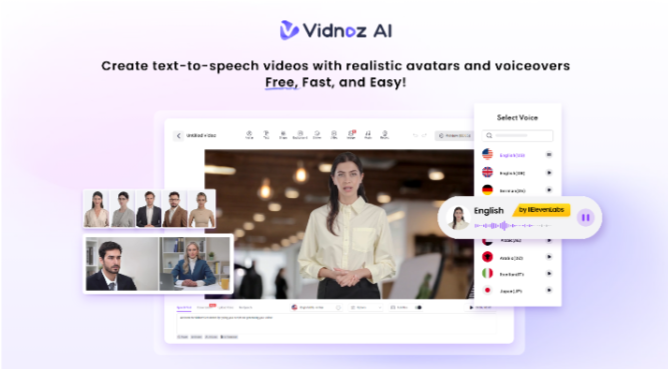
You can start with a written script and select an AI presenter. The platform can generate the voiceover and synchronize it with the avatar. Templates provide a starting visual structure, while built-in tools let you add text, images, backgrounds, and other elements.
This means someone who has never used professional editing software can still produce a structured video.
The Features of Vidnoz AI That Make Video Creation Easier
Here we have the list of amazing features you can experience with Vidnoz AI.
More Than 2,000 Lip-Sync AI Voices
Voice recording is one of the tasks that can make video production difficult for beginners. Finding a quiet space, recording several takes, and editing the audio can take considerable time.
Vidnoz AI provides 2,000+ lip-sync AI voices. These give users a range of voices and languages to choose from. The selected narration can work with the AI avatar so the mouth movements follow the spoken words. This is useful for videos where you want a presenter without appearing in front of a camera.
A Library of 2,800+ Templates
Templates can be particularly useful when you have no editing experience. Vidnoz AI offers more than 2,800 templates, covering different subjects, industries, and video formats. These can provide a visual starting point for any type of AI videos you want to create.
You can start with an existing structure and change the content to suit your topic rather than deciding where every element should go.
1,900+ AI Avatars for Different Video Styles
Choosing the right presenter can change the feel of a video. Vidnoz AI provides 1,900+ lifelike avatars representing different roles and appearances. You can find presenters suitable for business communication, teaching, customer support, product demonstrations, and other topics.
There are also several ways to create an avatar.
- Avatar Lite is designed for quicker creation.
- While Custom Avatar Pro offers more advanced options, including greater control over elements such as backgrounds.
- The platform also provides Motion Avatars, which can create full-body movements such as gestures, posture changes, and facial expressions. These can also be used for videos featuring different cartoon styles.
Free Daily Usage
You do not necessarily need to pay before testing the platform. Vidnoz AI offers a free usage option, including 2 minutes of free use each day under the stated offering.
This helps the newbies get a feel for various avatars, voices, templates, and video concepts without risking a full investment.
A Beginner-Friendly Way to Build Your First Video
Creating videos with Vidnoz AI is extremely easy. Here are the simplest steps to follow to make videos using Vidnoz AI.
Pick the Look Before Writing the Scenes
First, select a template or an avatar in tune with your topic. Think about the audience and the purpose of the video before making your selection. A business tutorial may need a different presenter and layout than a casual social media clip.
Add Your Script and Choose a Voice
Write a clear script and place it into your project. Select an AI voice that fits the subject, language, and style you want. Vidnoz AI can generate the narration and match it with the avatar’s lip movements, avoiding the need for separate audio editing.
Add Simple Visual Details
Use the available editing options to add titles, captions, images, backgrounds, logos, and supporting graphics. You do not need to fill every part of the screen. Keep the design clean and let each visual support the words being spoken.
Generate, Watch, and Share
Create the finished video and watch it before publishing. Look for pronunciation issues, awkward pauses, incorrect text, or scenes that move too quickly. Make small changes if needed, then export the video and share it on your chosen platform.
Final Thoughts
Creating videos no longer has to begin with learning complicated editing software. Vidnoz AI gives beginners a simpler route from a written idea to a finished video through AI avatars, voices, templates, and automated video creation features.
Vidnoz AI video generator offers a vast library of features. This means users have plenty of ways to experiment with different formats. The ISO/IEC 27001:2022 Certification of this platform also gives businesses an important information-security factor to consider.
The key is not to create an overly complicated video. Be sure to have an idea in mind, have a helpful script, select a presenter, keep visuals basic, and let the AI do much of the production. That can make video making much less daunting for anybody lacking the editing expertise.