
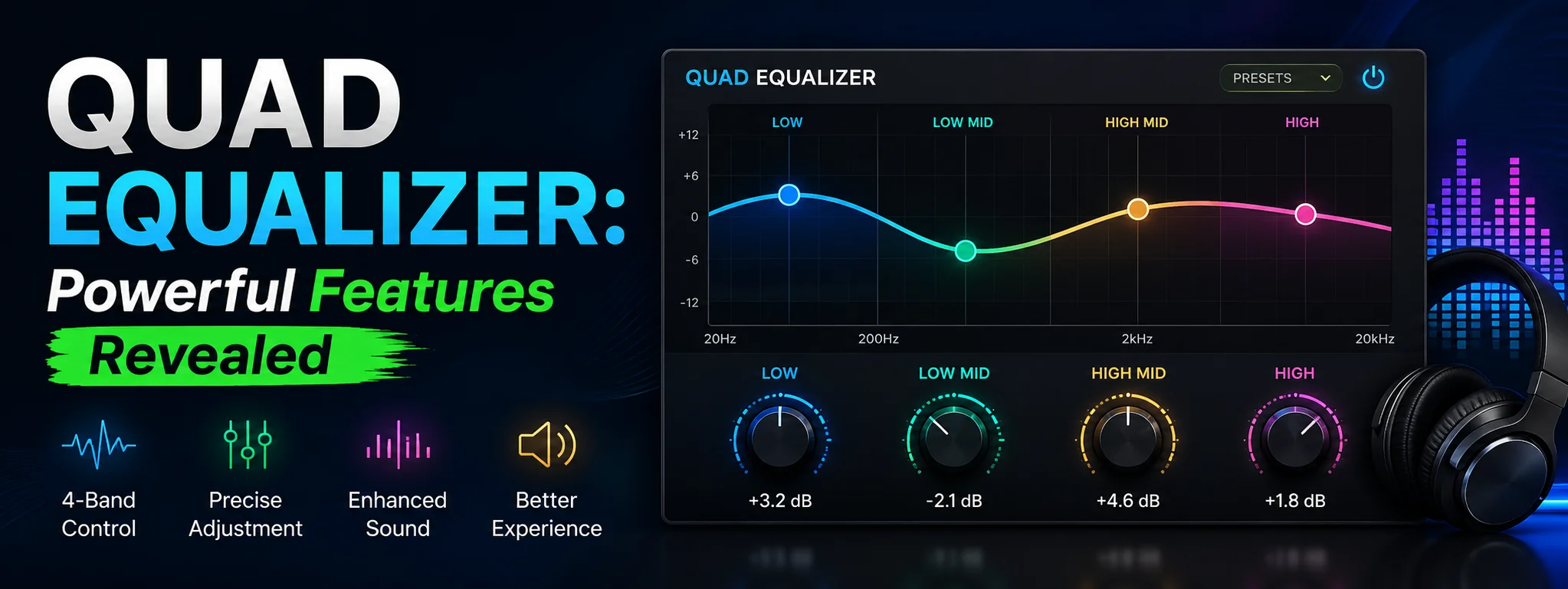
Audio quality plays a major role in how we experience music, movies, podcasts, and games. While most devices include basic sound settings, many users want greater control over how their audio sounds. This is where a Quad Equalizer becomes valuable. It offers advanced audio customization, allowing users to adjust different frequencies and create a listening experience tailored to their preferences.
Whether you’re an audiophile seeking crystal-clear sound, a gamer looking for immersive effects, or someone who simply enjoys better music quality, understanding the features of a Quad Equalizer can help you get the most from your speakers or headphones.
What Is a Quad Equalizer?
A Quad Equalizer is an advanced audio equalization tool designed to let users fine-tune sound frequencies. Unlike simple bass and treble controls, it provides multiple frequency bands that can be adjusted independently to improve overall audio performance.
The word “Quad” often refers to enhanced multi-band sound processing, allowing users to customize audio profiles for different types of content such as music, gaming, movies, and voice calls.
With a Quad Equalizer, you can:
- Boost bass without distorting vocals.
- Enhance speech clarity.
- Improve instrument separation.
- Reduce unwanted frequencies.
- Create personalized sound presets.
Key Features of a Quad Equalizer
Multiple Frequency Band Controls
One of the biggest advantages of a Quad Equalizer is its ability to adjust several frequency ranges individually.
Common frequency areas include:
- Low Frequencies (20–250 Hz): Bass and deep sounds.
- Mid Frequencies (250 Hz–4 kHz): Vocals and instruments.
- High Frequencies (4–20 kHz): Treble, detail, and clarity.
This level of control allows users to create a balanced sound profile based on their listening preferences.
Custom Audio Presets
Most Quad Equalizers come with built-in presets such as:
Rock
Boosts guitars and drums for energetic music.
Pop
Balances vocals and bass for mainstream tracks.
Classical
Enhances orchestral detail with natural sound reproduction.
Jazz
Improves instrument separation while maintaining warmth.
Bass Boost
Perfect for EDM, hip-hop, and action movies.
Users can also save their own custom presets for quick access.
Real-Time Audio Adjustment
Unlike older equalizers that require restarting applications, many modern Quad Equalizers apply changes instantly.
Benefits include:
- Immediate sound preview
- Easy fine-tuning
- Faster customization
- Better listening experience
This feature is especially useful when switching between music genres or different audio devices.
Surround Sound Enhancement
Many Quad Equalizers include virtual surround sound technology that creates a wider and more immersive audio stage.
This feature is ideal for:
- Gaming
- Home theater
- Streaming movies
- Virtual reality experiences
It helps users hear directional sounds more accurately, improving immersion.
Noise Reduction Technology
Some advanced Quad Equalizers include built-in noise filtering features that help remove unwanted background sounds.
Examples include:
- Static noise
- Electrical interference
- Low-frequency hum
- Microphone background noise
This creates cleaner and more enjoyable audio.
Device Compatibility
A quality Quad Equalizer supports multiple devices including:
- Windows PCs
- Android smartphones
- Tablets
- Bluetooth speakers
- Headphones
- External sound cards
Many applications also integrate with popular music streaming platforms.
Benefits of Using a Quad Equalizer
Better Music Quality
A properly configured equalizer enhances:
- Vocal clarity
- Instrument separation
- Bass response
- Treble detail
Even compressed audio files often sound noticeably better after proper equalization.
Improved Gaming Experience
Gamers can enhance:
- Footstep sounds
- Environmental effects
- Dialogue clarity
- Directional audio
This provides a competitive advantage in many multiplayer games.
Enhanced Movie Audio
Movies often contain complex soundtracks.
A Quad Equalizer helps improve:
- Dialogue volume
- Explosions
- Background music
- Surround effects
The result is a more cinematic listening experience.
Personalized Listening Profiles
Everyone hears sound differently.
A Quad Equalizer allows users to create profiles based on:
Music
Balanced vocals and instruments.
Podcasts
Enhanced speech clarity.
Gaming
Focused directional effects.
Movies
Powerful bass with clear dialogue.
How to Set Up a Quad Equalizer
Step 1: Install the Software
Download and install your preferred Quad Equalizer application or use the equalizer included with your device.
Always choose software from trusted sources.
Step 2: Select Your Audio Device
Open the application and choose:
- Speakers
- Headphones
- Bluetooth earbuds
- External DAC
Selecting the correct output ensures accurate sound processing.
Step 3: Choose a Preset
Start with a built-in preset closest to your listening style.
This provides a solid starting point before making manual adjustments.
Step 4: Fine-Tune Frequencies
Adjust each frequency gradually.
Avoid extreme boosts because they can cause distortion.
Small adjustments usually produce the best results.
Step 5: Save Your Settings
Once satisfied, save your custom profile.
You can create multiple profiles for different activities.
Best Equalizer Settings for Different Uses
For Music
Recommended adjustments:
- Slight bass boost
- Balanced mids
- Clear highs
This produces rich and natural sound.
For Gaming
Increase:
- Mid frequencies
- High frequencies
Reduce excessive bass to improve footsteps and positional audio.
For Movies
Enhance:
- Low frequencies
- Dialogue frequencies
- Surround effects
This creates a theater-like experience.
For Podcasts
Focus mainly on:
- Mid frequencies
- Vocal clarity
Reduce unnecessary bass for clearer speech.
Common Mistakes to Avoid
Many beginners make simple equalizer mistakes that reduce sound quality.
Avoid:
- Increasing every frequency band
- Using maximum bass boost
- Ignoring distortion
- Applying identical settings to every device
- Forgetting to save custom profiles
Balanced adjustments almost always sound better than extreme ones.
Tips to Get the Best Performance
Use High-Quality Audio Files
Lossless or high-bitrate audio gives better results.
Wear Quality Headphones
Better headphones reveal more audio detail.
Update Your Audio Drivers
Updated drivers improve compatibility and performance.
Experiment with Presets
Try different profiles before creating your own.
Make Small Adjustments
Changes of 1–3 dB are often enough to produce noticeable improvements.
Is a Quad Equalizer Worth Using?
If you regularly listen to music, watch movies, play games, or create audio content, a Quad Equalizer is definitely worth exploring. It gives you much greater control than standard audio settings and can dramatically improve your listening experience.
From customizable presets to real-time frequency adjustments and virtual surround sound, it offers tools that suit both beginners and experienced users. Once configured correctly, you’ll notice clearer vocals, deeper bass, and more balanced sound across all your favorite content.
Final Thoughts
A Quad Equalizer is more than just an audio enhancement tool—it’s a way to personalize your entire listening experience. With features like multi-band frequency control, surround sound enhancement, custom presets, and noise reduction, it empowers users to achieve professional-level audio quality without expensive equipment.